> ## Documentation Index
> Fetch the complete documentation index at: https://docs.brewit.ai/llms.txt
> Use this file to discover all available pages before exploring further.
# CSV
CSV files are securely stored in the **Brewit-hosted Postgres database**. Each
file will be stored as a table in the database.
## Import your CSV file
Choose **CSV** or **Brewit Workbook**
[here](https://app.brewit.ai/resources/new)
Edit the table name. Default: the file name
Only letters, numbers, and underscores, must start with a letter, max
length 63, all lowercase
Click **Test Connection** button to verify that Brewit can successfully
connect to BigQuery. If the test fails, check the data source settings and
try again.
Click **Save** button to complete the setup. Now you can start chatting with
Brewit's BI agent to analyze your data.
## Data Formatting Guidelines
### ❌ Improper data formatting
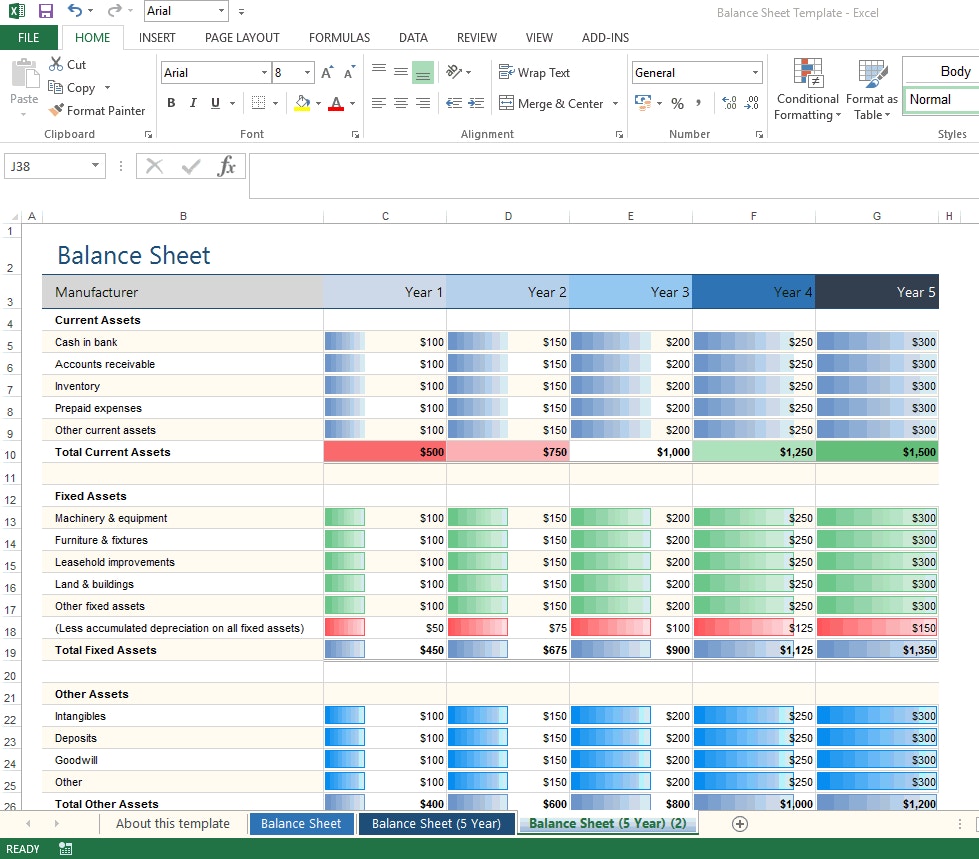
Composite spreadsheets or irregularly formatted data may not be able to be analyzed or transformed by Brewit. Below are several common issues to avoid:
* **Multiple sections**. Your spreadsheet cannot have multiple sections.
* **Multiple tables**. Similar to the point above, there should not be multiple tables in your uploaded sheet.
* **Empty rows**. Make sure there are no empty rows (or columns).
 ### ✅ Proper data formatting
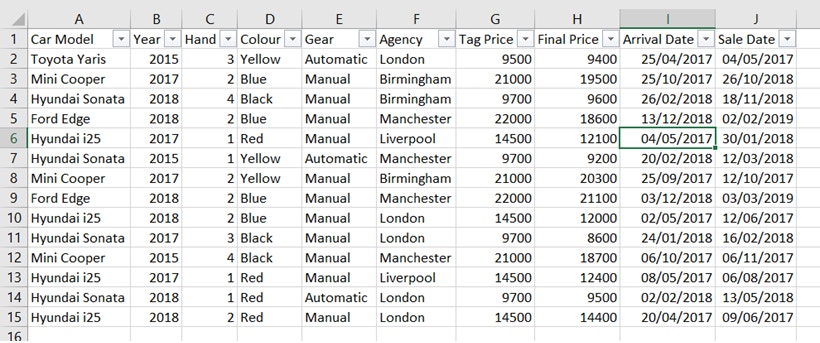
Well-cleaned and structured data enables Brewit to perform accurate and error-free data analysis and visualization. Below are best practices to follow:
* **Column headers**. Descriptive column headers must be in the first row.
* **Tabulation**. Your data should be in the form of rows of records below the headers.
* **Universality**. Plain, generally understandable language for column names is recommended rather than industry- or company-specific jargon.
### ✅ Proper data formatting
Well-cleaned and structured data enables Brewit to perform accurate and error-free data analysis and visualization. Below are best practices to follow:
* **Column headers**. Descriptive column headers must be in the first row.
* **Tabulation**. Your data should be in the form of rows of records below the headers.
* **Universality**. Plain, generally understandable language for column names is recommended rather than industry- or company-specific jargon.